
Stop The Photo Chaos: The Genius Hack To Organize 10,000 Baby Pictures
Mama, I see you. You are sitting there with a sleeping baby on your chest, your phone in one hand, and a notification popping up that says ‘Storage Full.’ You scroll back through your camera roll and see 47 nearly identical photos of your little one’s first smile, 112 blurry shots of them trying to crawl, and a sea of screenshots you meant to save for nursery inspiration. It feels like a mountain you’ll never climb, doesn’t it? As a doula and a fellow mom, I know that these photos aren’t just ‘data’—they are the heartbeat of your journey. But when you have 10,000 unorganized images, those precious memories get lost in the digital noise.
We spend so much time nesting and organizing the nursery, but we often forget to nest our digital lives. Today, we are going to change that. I’m going to share the Genius Monthly Batching Hack that will take you from ‘Digital Hoarder’ to ‘Family Historian’ in just fifteen minutes a month. We’re going to stop the overwhelm, clear the clutter, and ensure that when your little one is grown, you actually have a curated legacy to show them, rather than a chaotic cloud of pixels.
The Psychology of the ‘Mom-Roll’ Overwhelm

Why do we have so many photos? It’s simple: fear of forgetting. In those hazy postpartum days, every blink and every wiggle feels monumental. We take twenty photos of the same nap because we’re afraid the ‘perfect’ one might be the one we didn’t take. But here is the sisterly truth: Having 10,000 photos is the same as having none if you can never find the one you’re looking for.
The mental load of motherhood is heavy enough without the added weight of digital clutter. When your phone is constantly full, it creates a subtle, underlying stress. You worry about losing photos if your phone breaks, or you feel guilty that you haven’t made a baby book yet. We need to shift our mindset from capturing everything to curating the best.
“Your child won’t want 10,000 photos of their infancy; they will want the 100 photos that tell the story of how much they were loved.”
By implementing a system, you are giving yourself the gift of mental space. You are moving from a reactive state (panicking when storage is full) to a proactive state (knowing exactly where every milestone is stored). Let’s look at the common ‘storage traps’ we fall into:
| The Storage Trap | The Reality Check |
|---|---|
| The ‘I’ll Do It Later’ Pile | Later never comes during the toddler years. |
| The Duplicate Dilemma | You only need one clear shot of the first bite of peas. |
| The Cloud Confusion | Paying for extra storage is just a band-aid for a lack of organization. |
The Genius Hack: The ‘Year-Month-Event’ Naming System
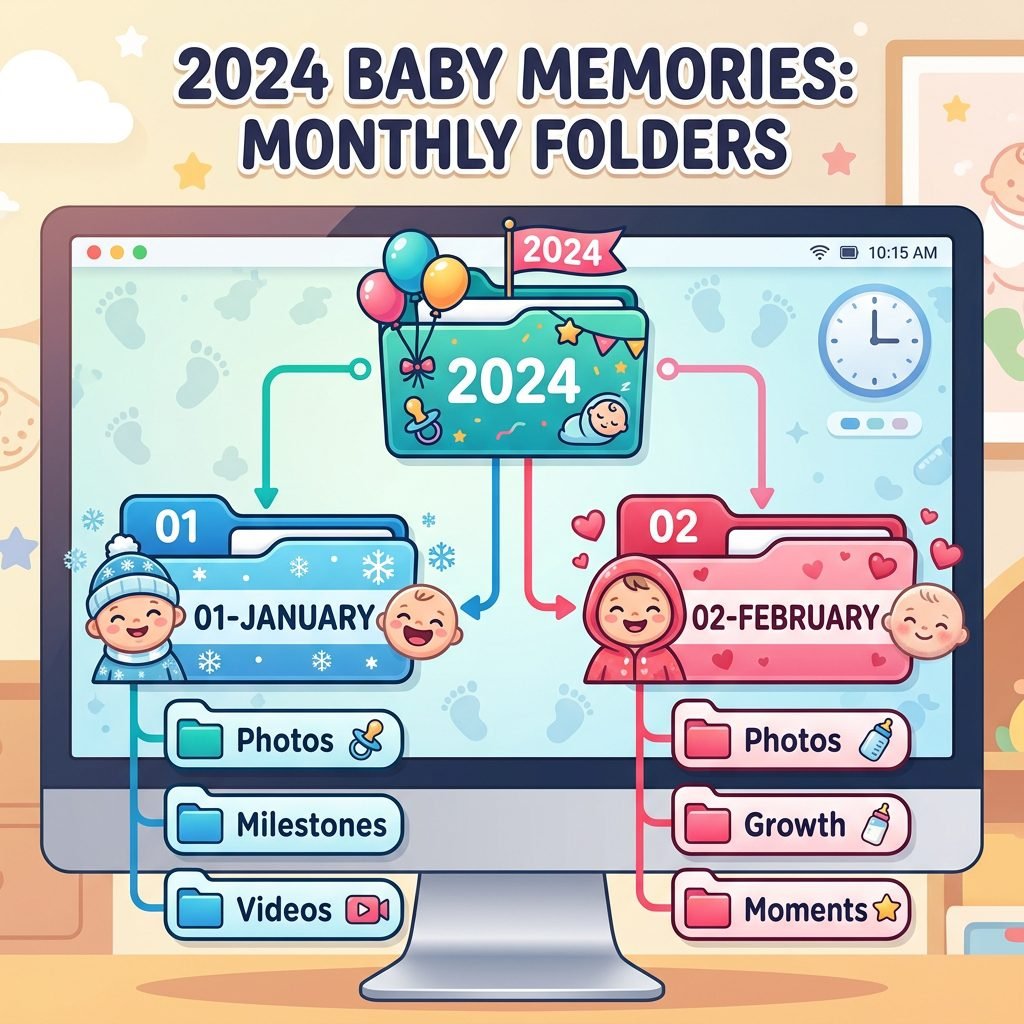
The secret to organizing 10,000 photos isn’t a fancy AI software—it’s a consistent naming convention. Most moms make the mistake of creating folders like ‘Baby’s First Year’ or ‘Summer 2023.’ These are too broad! When you’re looking for that specific photo of the 4-month checkup, you’ll still be scrolling for hours.
The Genius Hack is the Chronological Nested Folder System. This system works on any platform (Google Photos, iCloud, or a physical Hard Drive). Here is exactly how you should structure your folders:
- Top Level: [YEAR] (e.g., 2024)
- Second Level: [MONTH NUMBER] – [MONTH NAME] (e.g., 05 – May)
- Third Level: [DATE] – [EVENT NAME] (e.g., 2024-05-12 – First Park Trip)
Why use the month number? Because computers sort alphabetically. If you just use ‘April’ and ‘August,’ August will come first. By using ’01 – January’ and ’02 – February,’ your child’s life stays in perfect chronological order automatically.
Step-by-Step Implementation
- Create your Master Year Folder. Start with the current year to avoid feeling overwhelmed by the past.
- Set a Monthly Calendar Alert. On the last Sunday of every month, spend 15 minutes moving photos from your phone into these folders.
- The ‘Favorites’ First Pass. Before moving anything, go to your phone’s ‘Favorites’ (the heart icon). These are the only ones that go into the ‘Event’ folders. The rest? They stay in a ‘General’ subfolder or get deleted.
Cloud vs. Physical: Where Should Your Memories Live?

As a doula, I always tell my clients: ‘One is none, and two is one.’ This applies to nursing pads, and it definitely applies to photo backups. You need a redundant system. If your photos only live on your phone, you are one toilet-drop away from losing everything.
I recommend a Hybrid Storage Approach. Use the cloud for easy access and sharing, but keep a physical backup for long-term security. Here is a comparison of the top tools for moms:
| Storage Tool | Best For… | Pros | Cons |
|---|---|---|---|
| Google Photos | Android & iPhone Users | Amazing search features (search ‘dog’ or ‘baby’). | Privacy concerns and storage limits. |
| iCloud | Apple Die-hards | Seamless integration with iPhone. | Hard to manage on non-Apple devices. |
| Amazon Photos | Prime Members | Unlimited full-resolution photo storage. | Video storage is very limited. |
| External SSD | The ‘Forever’ Backup | No monthly fees; you own the data. | Can be physically lost or damaged. |
Pro Tip: If you are an Amazon Prime member, use the Amazon Photos app. It offers unlimited photo storage at no extra cost. Set it to ‘Auto-Sync’ so your photos are backed up the moment you take them, then use the monthly hack to organize them into the folder structure we discussed above.
The 15-Minute ‘Purge & Polish’ Routine

Now, let’s talk about the 10,000 photos already sitting on your phone. Don’t try to organize them all in one day. You’ll burn out before you hit the six-month mark. Instead, use the ‘Backwards Ten’ method.
Every night while you are nursing, pumping, or waiting for the kettle to boil, scroll back to exactly one year ago today. Look at that month’s photos. Delete the fluff. Delete the screenshots of recipes you never made, the 5 identical shots of your coffee, and the blurry ‘oops’ photos. Keep only the gems.
The ‘Keep’ Criteria
Ask yourself these three questions to decide if a photo stays:
- Is it clear? (If it’s blurry, toss it unless it’s the only photo of a major event).
- Does it show a face or a feeling? (A photo of a messy living room is okay if it captures the ‘feeling’ of a Tuesday morning).
- Would I put this in a physical book? (If the answer is ‘no,’ it doesn’t need to take up space in your ‘Favorites’ folder).
“Cleaning your digital house is an act of self-care. It clears the clutter from your mind and makes room for new memories.”
From Screen to Soul: Printing Your Organized Memories

The final step in stopping the chaos is getting those photos off the screen. There is something deeply grounding for a child to see photos of themselves on the walls of their home. It builds a sense of belonging and identity.
Because you’ve now used my Monthly Batching Hack, making a baby book is no longer a six-month project. It’s a five-minute task. Since your photos are already in folders like ’05 – May – First Park Trip,’ you can simply upload that entire folder to a printing service.
| Printing Method | Effort Level | Best For… |
|---|---|---|
| Chatbooks | Low (Automatic) | Monthly ‘minis’ that arrive in the mail. |
| Artifact Uprising | Medium (Design-focused) | High-quality, heirloom coffee table books. |
| Digital Frame (Aura) | Zero (Once set up) | Sharing photos instantly with grandparents. |
| Local Print Shop | High (Manual) | Creating a curated gallery wall in the nursery. |
Doula Advice: Don’t wait for the ‘perfect’ time to print. A messy, candid photo of you rocking your baby at 3 AM is a thousand times more precious than a staged, professional newborn shoot where everyone was stressed. Print the real moments.
Conclusion
Mama, you are doing a beautiful job. Those 10,000 photos are a testament to how much you adore your little one. By implementing the Year-Month-Event system and committing to just 15 minutes a month, you are transforming that overwhelming ‘chaos’ into a structured legacy. No more ‘Storage Full’ warnings. No more scrolling for hours to find the first bath photo. Just a clear, organized, and peaceful digital home.
Start today. Pick just one month from last year and organize it. Feel that weight lift off your shoulders? That’s the feeling of being back in control. You’ve got this, sister!